Ryan Price and the Media
Commanding Chaos for Coworking, Open Source and Creative Communities

Main navigation

  • Blog
  • About
  • Contact
  • Subscribe
  • Drupal Easy
  • Florida Creatives
  • Liberatr
  • Lifestream
  • ThinkUp
  • Home
User account menu
  • Log in

Breadcrumb

  1. Home
  2. Use Smart Mailboxes To Organize Your Email

Use Smart Mailboxes to Organize Your Email

By rprice , 26 October 2008
Categories
HowTo
Tech
Tags
email
interface
Mac OS
Teaching

Howto: Yahoo P… (not verified)

17 years 9 months ago

[...] at is under Operators >

[...] at is under Operators > Filter. Drag this one out and take a look - this one reminds me of the Smart Mailbox rules in Mail.app, and it works in much the same [...]

If you're anything like me, you tend to hold on to your email for months, years, or pretty much all of eternity. All Mailboxes Now that I have things like Google Apps for Your Domain and IMAP, I can literally keep as much of my email as I want, and always get access to my full message history. On top of this, I have 7 inboxes to check.
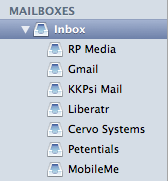
There are several advantages to this system as far as I can see - I never have to worry that someone has the wrong email address, or one I no longer use, because I always know the message will arrive on my desktop, but at the same time live somewhere on dark and dank hard drive deep in the Google infrastructure, wherever that may be.

Messages Today: 20 Here is my big problem: I get dozens of messages a day. On the day I wrote this tutorial I had received 20 messages by noon! How on earth am I supposed to keep track of the messages I want to keep, without abandoning my pack rat nature?

My solution for now: Smart Mailboxes. You've at least seen Smart Playlists in iTunes - the program ships with a few of them baked in. The Finder also features a few pre-selected searches under "search for" on Leopard. Apple's Mail.app has had Smart Mailboxes for some time now, and it's about time you got a little more insight into what is going on with your mail.

Saved Search The very simplest way to create a Smart Mailbox is to use the little search box in the top right of your Mail window and push the Save button. That's really all there is to it. You can choose a few simple options from the popup box - the application has already chosen a sensible folder name for you, based on what you searched. You could try searching for something related to a big project you're working on, or all the messages from a particular friend, or a group of friends. The possibilities are endless.

What are some of your favorite Smart Mailbox formulas? I'd love to see them in a comment.

Twitter / liberatrRyan Price | Facebook Flickr: Photos from Liberatr.netInstagramYouTube :: Videos by liberatrLinkedIn: Ryan Price

I am nobody's puppet.

Disclaimer: My blogs are not a reflection of my employer's opinions, but are my own, and often unfiltered. Also, some links on this site may be part of an Amazon Associates program, so by clicking on them you help me pay for my independence.

Drupal Association - Individual Member Acquia Certified Developer Acquia Certified Developer Miro Video Player | Download torrents and podcasts, play any video, and do it with style. Gimp - a freely distributed piece of software for such tasks as photo retouching, image composition and image authoring. Processing is an electronic sketchbook for developing ideas. Build a custom arts management solution. LibreOffice is the free power-packed personal productivity suite that gives you six feature-rich applications for all your document production and data processing needs

  • Thanks again, Steve. I hope
    14 years 1 month ago
  • Hi - bit late responding here
    14 years 1 month ago
  • Should have added...
    14 years 3 months ago
  • Hi Ryan,
    14 years 3 months ago
  • Ryan,
    14 years 3 months ago
  • It is happening and you are
    14 years 6 months ago
  • In close future I want to
    14 years 8 months ago
  • the article has been
    14 years 9 months ago
  • I think it's a great coup for
    14 years 9 months ago
  • My hardware box acts as an
    14 years 10 months ago

  • Blogging Fringe
  • Bringing Art and Technology Together
  • Drupal Easy Podcast
  • Florida Creatives Podcast
  • Invisible Frisbee
  • Liberatr.net Facebook
  • Liberatr.net
  • Orlando Podcasters
  • Orlando Scene TV
  • Orlando Video
  • Our Yellow House
  • Pulpp.net Orlando Blogs
  • Pulpp.org Real-Time Collaboration
  • Shrink Your Ecological Footprint
  • The Student of the Game

  • Alex Rudloff
  • Apartment E
  • Brian Feldman
  • Chad Miller
  • Charles Krueger
  • Chris Messina
  • Chris Scott
  • Chris Wojda
  • Daniel H. Pink
  • Daniel Smith
  • Darren McDaniel
  • David Terrar
  • Destination Journal
  • Dr. XNLB
  • Elizabeth Maupin
  • Eric Marden
  • Hugh McLeod
  • Jana Waring
  • Jeremy Harrington
  • John Rife
  • Josh Hallet
  • Katie Ball
  • Katharine Miller
  • Lloyd Davis
  • Loren Feldman
  • marc. with a c.
  • Marc Rapp
  • Mario Andy Lurig
  • Mark Baratelli
  • Mike G
  • Noel Hidalgo
  • PSFK
  • Rebekah Lane
  • Stephen Matheny
  • Thomas Thorspecken
  • Tim Welch

  • Florida Drupal Group
  • Izon Orlando
  • Orlando Coworking
  • Orlando Fringe
  • Orlando Improv Festival
  • Orlando PHP
  • Orlando Puppet Festival
  • Page 15
  • The Daily City
  • Urban ReThink

Powered by Drupal

<none>

  • RSS Feed